Functionality Profiles
The functionality profile configures the LS POS functionalities.
The functionality profile can be set on the store or terminal. The store is used as the default funtionality profile and if a functionality profile is also selected for the terminal this will override the store setting.
To open Functionality profiles select Sites > Profiles > Functionality
Functionality profile card:
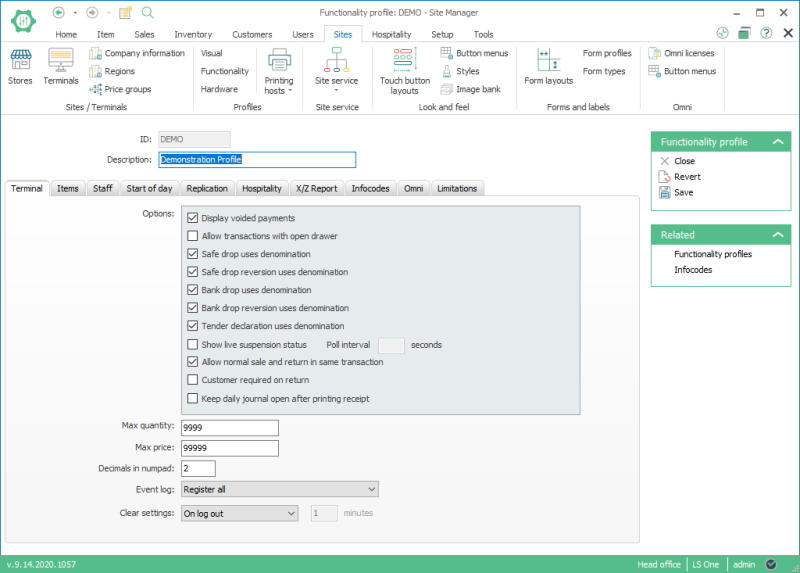
The options are grouped on four tabs:
- Terminal: There are different options, for example maximum quantity and maximum prices allowed in a POS sale.
-
Items: Fields relating to the item search in POS, such as allowing image search and whether to display voided items on receipt. Here it is also possible to set a default image for items that will be used in the image search.
- Staff: Fields related to the staff log on.
- Start of day: Here the start of day operation can be set to be triggered on logon after having run the End of day operation.
- Replication: If the POS should trigger the replication of transaction directly after each sale the post transaction job and the scheduler location need to be set in this tab.
- Hospitality: For the Hospitality system.
- X/Z Report: Settings for the sales and statistics reports.
- Infocodes: Here it is possible to link infocodes to certain actions. More information about infocodes.
- LS Commerce: These settings all apply for the Mobile apps.
- Limitations: Payment types can be limited to payments of certain kinds of items. Here are some settings to control how the limitations are displayed in the POS.
See also
| Last updated: | June 2020 |
| Version: | LS One 2020 |

